Back-office software for painting contractors
Stop guessing whether your jobs actually made money.
Painter's Log runs estimating, timekeeping, field capture, job management, job costing, invoicing and close-out in one system, showing you what every job truly cost, so you price from real-world numbers.
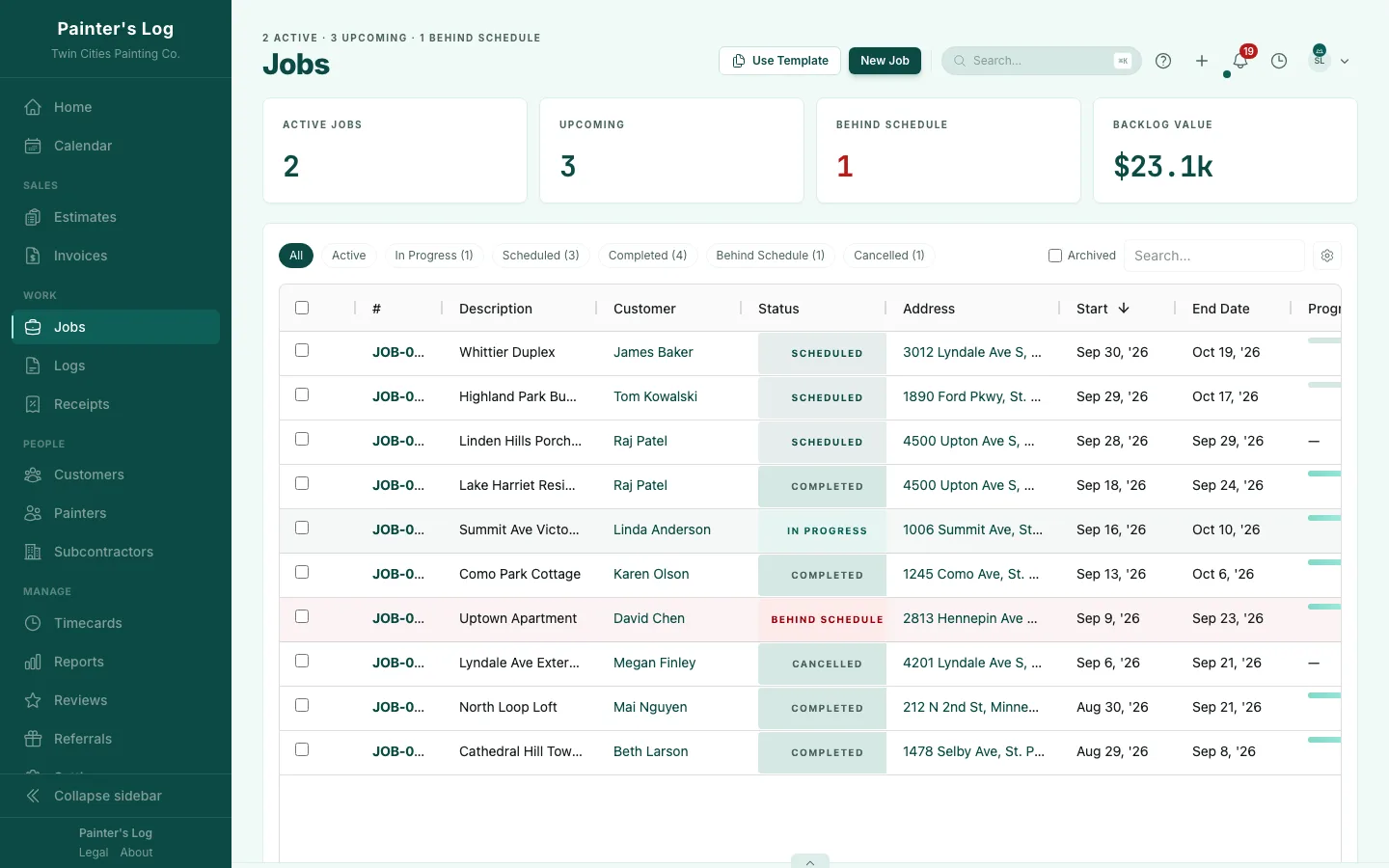
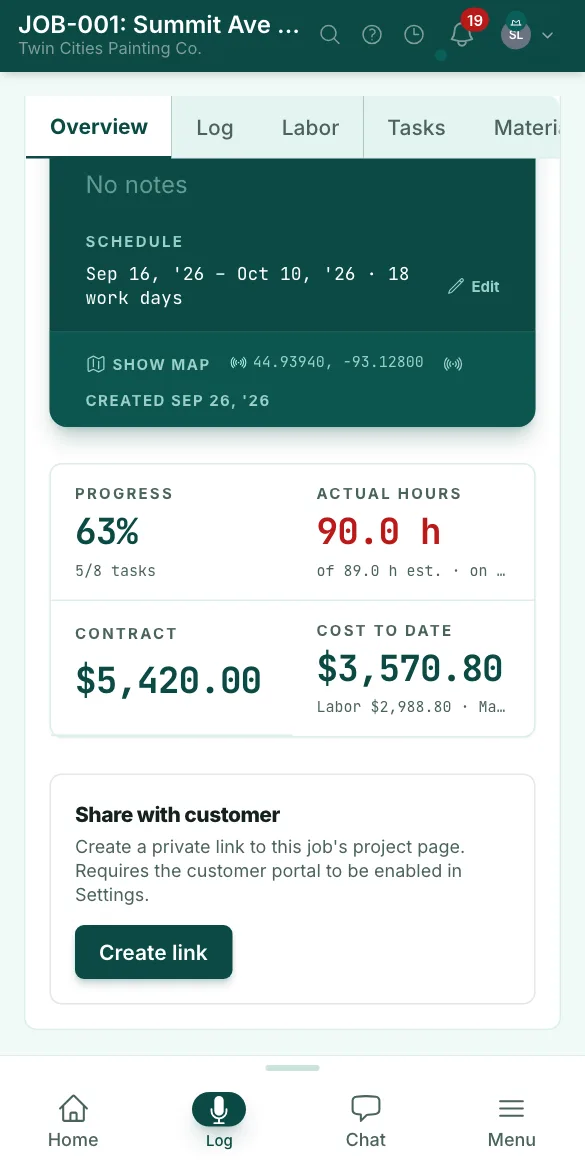
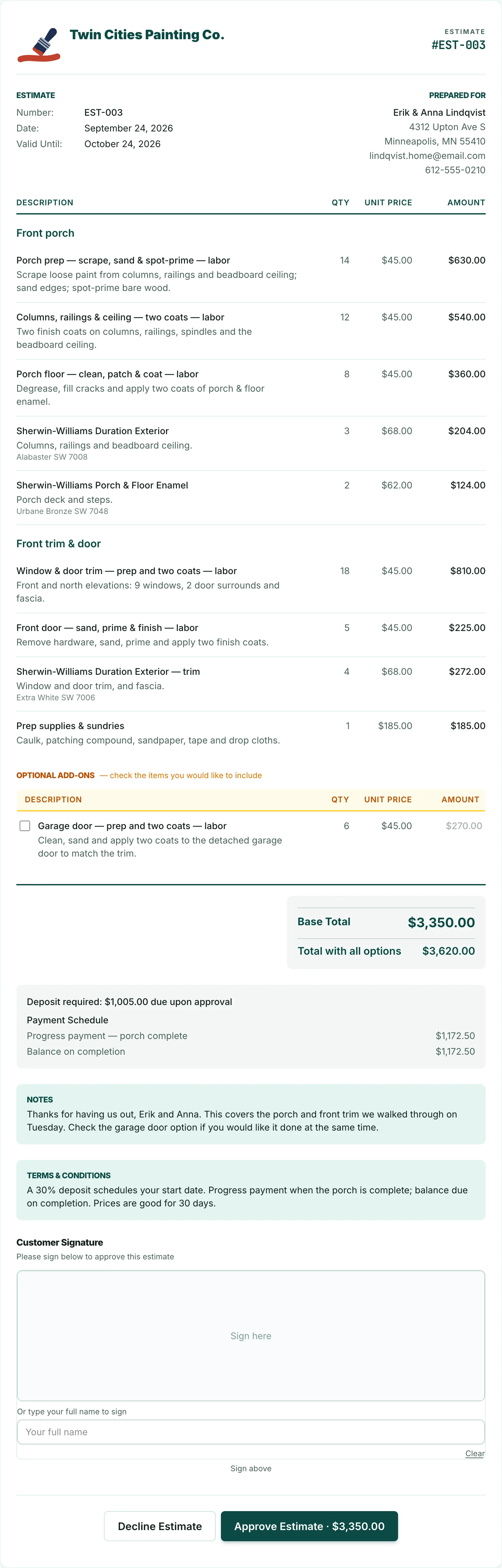
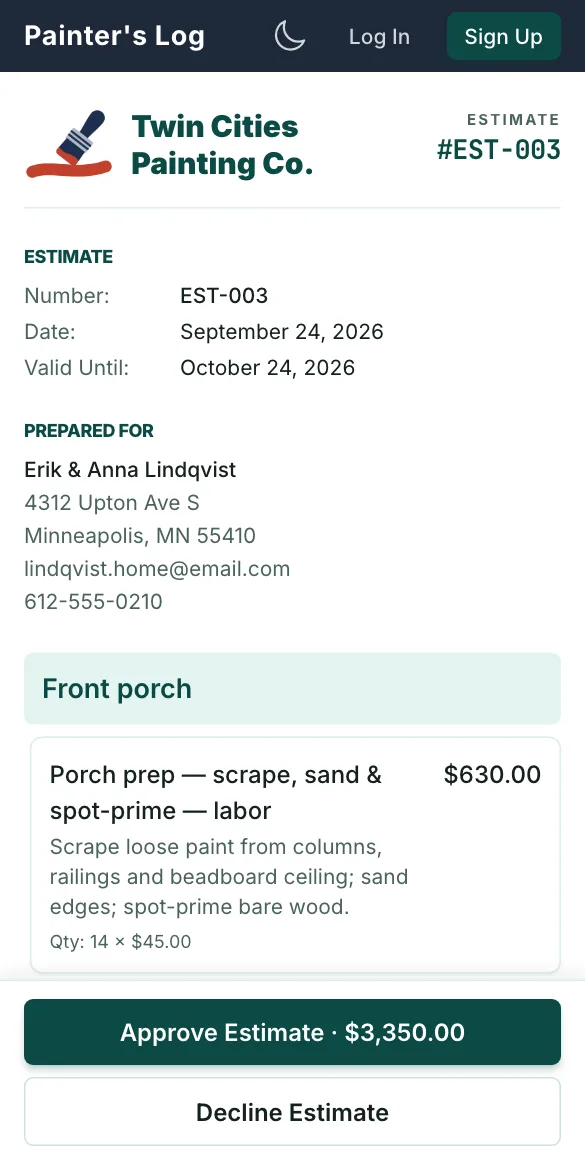
Step 2 of 5 · Estimates and e-signature
Estimates and e-signature
Create and send professional estimates in minutes, then turn them into jobs with one click when your customer signs.
- Start from a template or a blank estimate, and add labor, material and other lines, grouped by room or area.
- Send it by email: your customer gets a link and a PDF copy. The estimate opens in any browser, with no login and nothing to install.
- They tick the optional add-ons they want, and the total updates as they go.
- Markup, discounts and sales tax are calculated for you, along with the deposit and the payment schedule.
- They approve it by signing on screen with a finger or typing their name. The approval is saved with its date and IP address.
- You're notified when they first open it, and when they approve or decline it.
- One click turns the approved estimate into a job, with tasks from its labor lines and budgets from its totals.
Step 3 of 5 · Scheduling
Scheduling
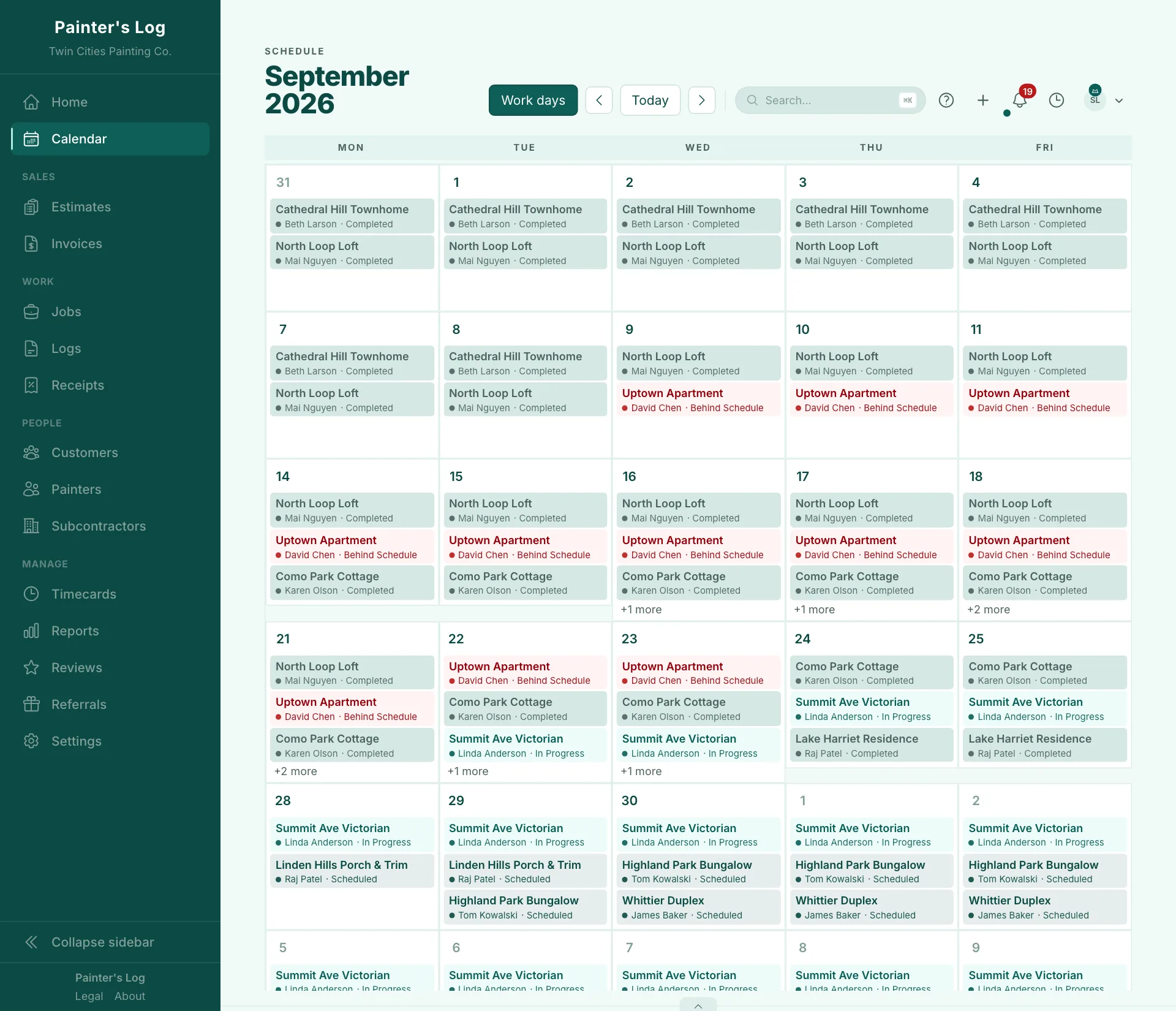
See every scheduled job on one calendar, marked by status: what's finished, what's running late and what starts next.
- The whole month on one calendar, with each job's customer and status on every day it runs.
- Completed, in progress, behind schedule and scheduled jobs each have their own color.
- A job still in progress after its end date is marked Behind Schedule automatically, and you're notified.
- Drag a job to another day on your computer to reschedule it. It keeps its length.
- Jobs without dates wait in an unscheduled list until you click to place them.
- Your customer gets an email when their project is scheduled.
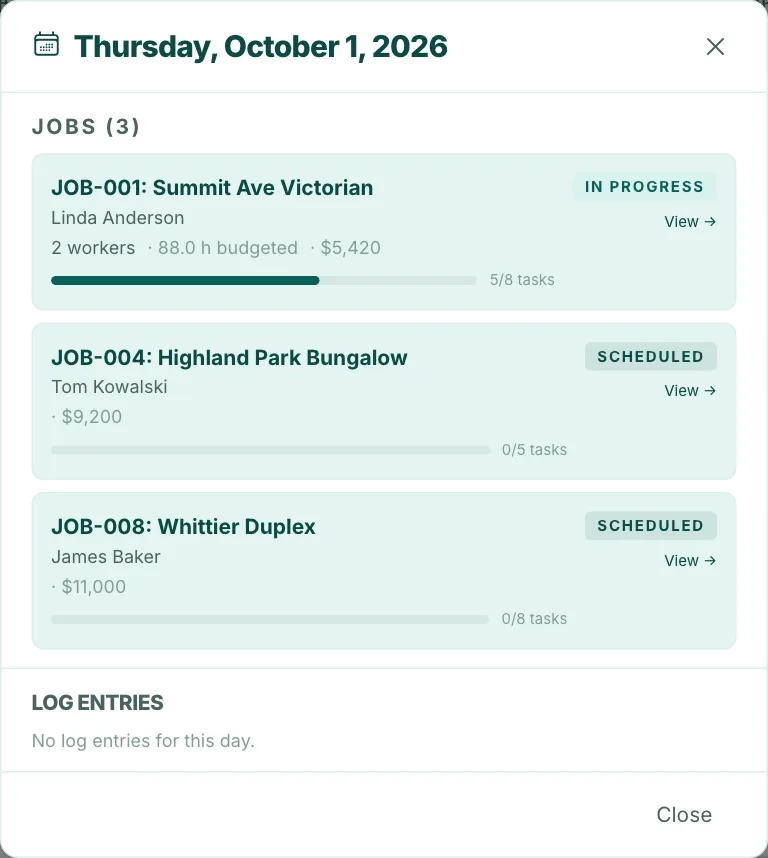
- Click a day to see its jobs, the weather, task progress and notes.
Step 4 of 5 · Time, photos and receipts
Time, photos and receipts
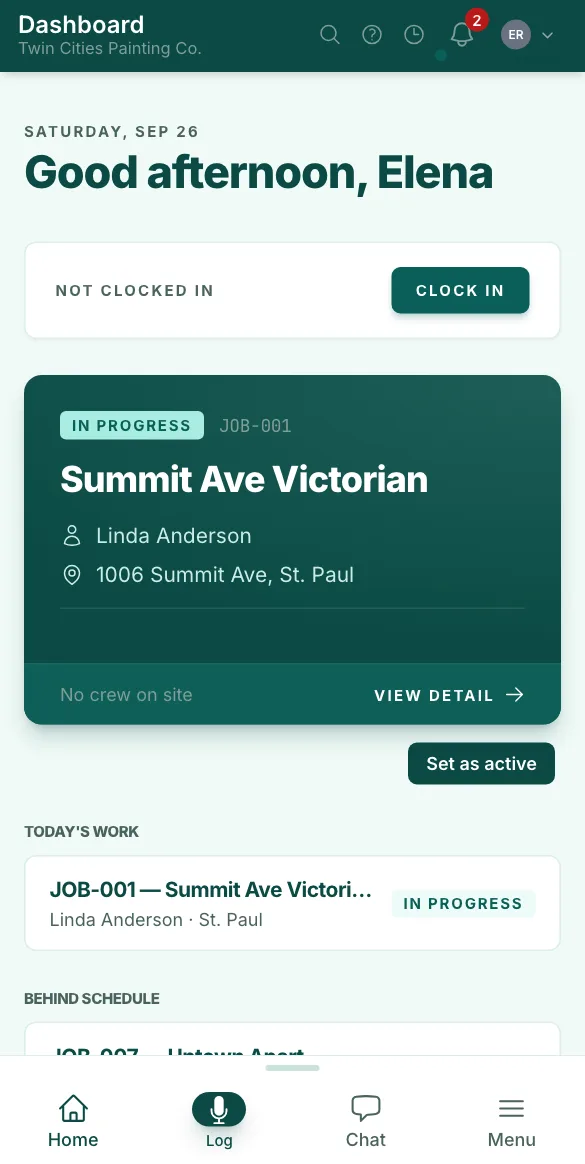
Your crew clocks in on their phones, and their hours, photos and receipts are filed to the job they're working on.
- Painters clock in from their phone's browser in two taps. There's nothing to download: it adds to the home screen like an app.
- At the job site, the shift is matched to that job, as long as location is turned on.
- Arrivals and departures are logged while they're clocked in with the app open, so a day on two jobs is split between them.
- Photos and short videos are filed to the job, and upload when there's signal again.
- A voice note is saved as text.
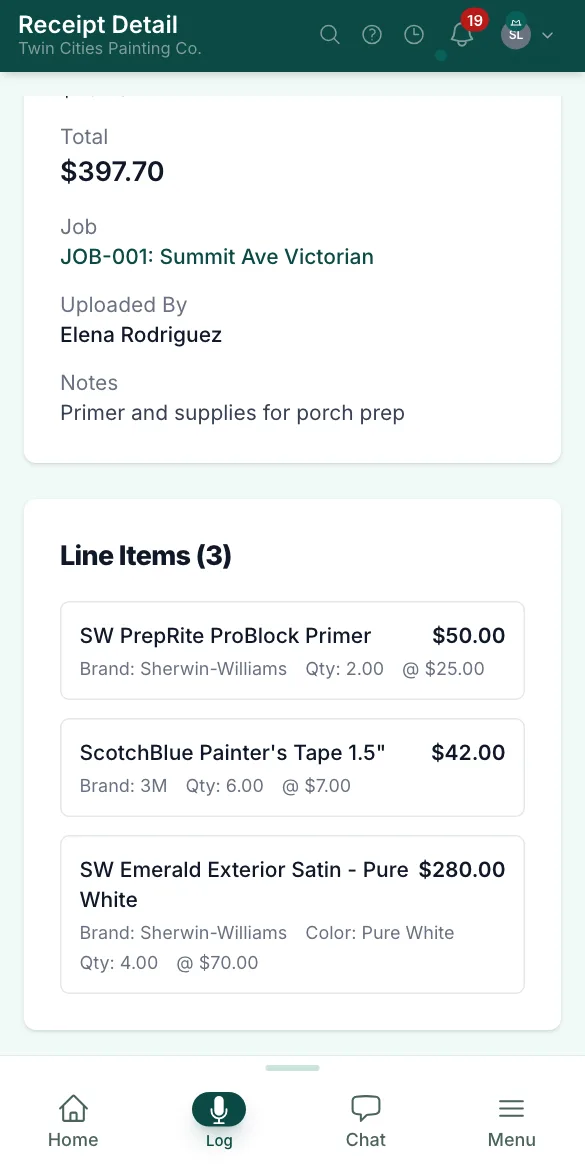
- Snap a receipt, and its lines — product, quantity, price, color and sheen — are read and filed to the job you choose.
Step 5 of 5 · Invoices and payments
Invoices and payments
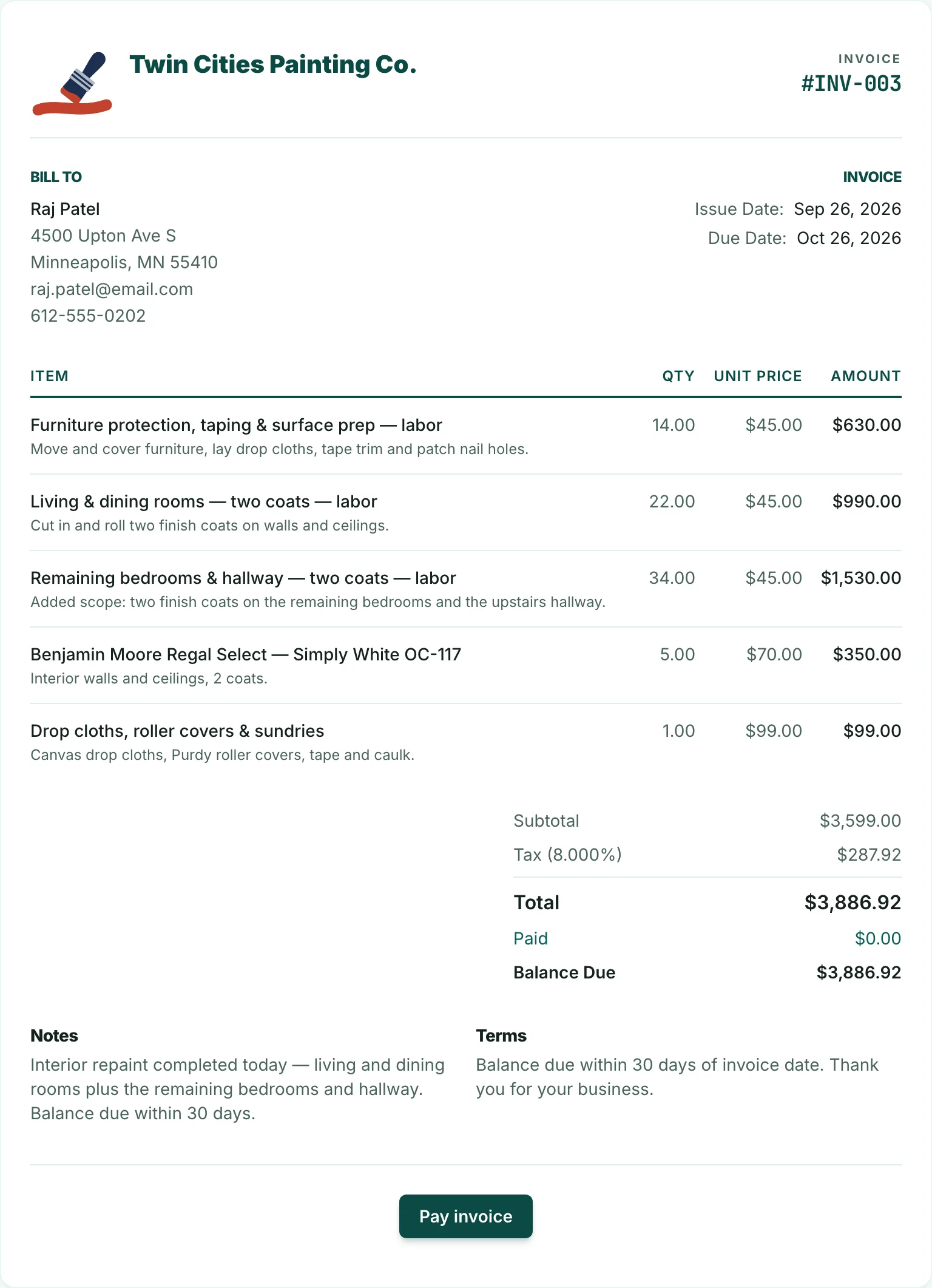
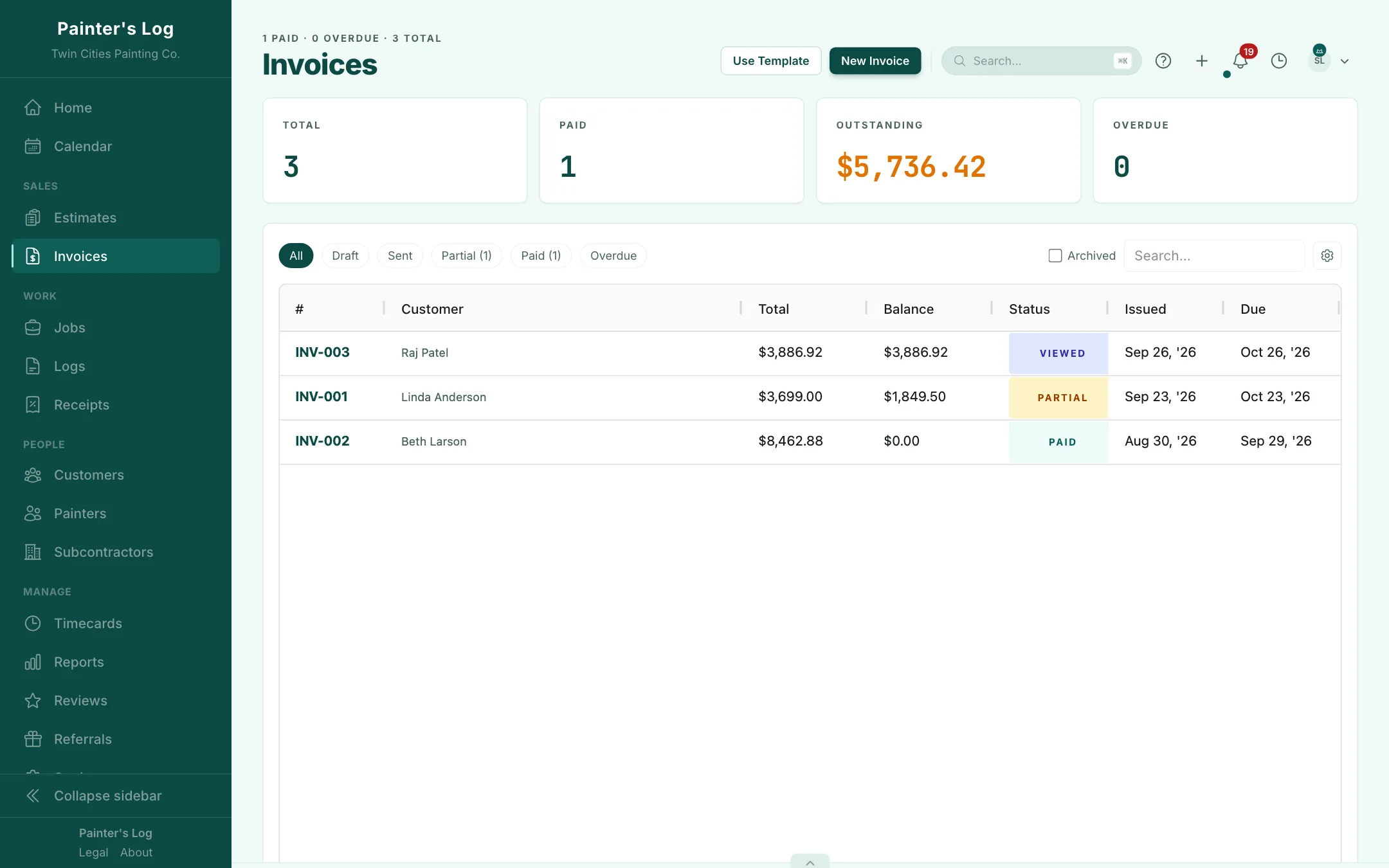
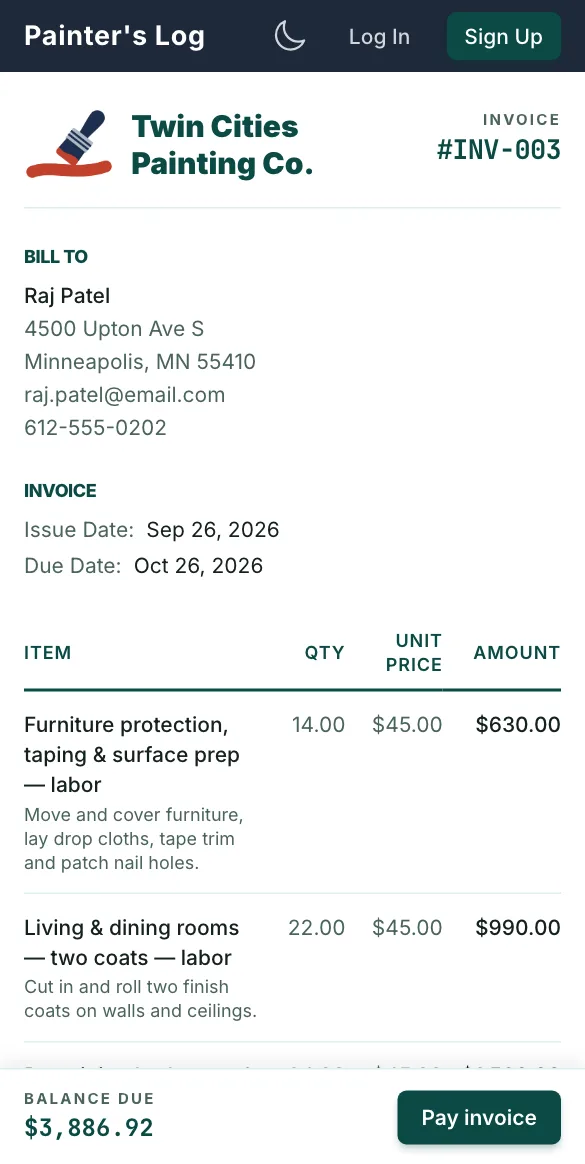
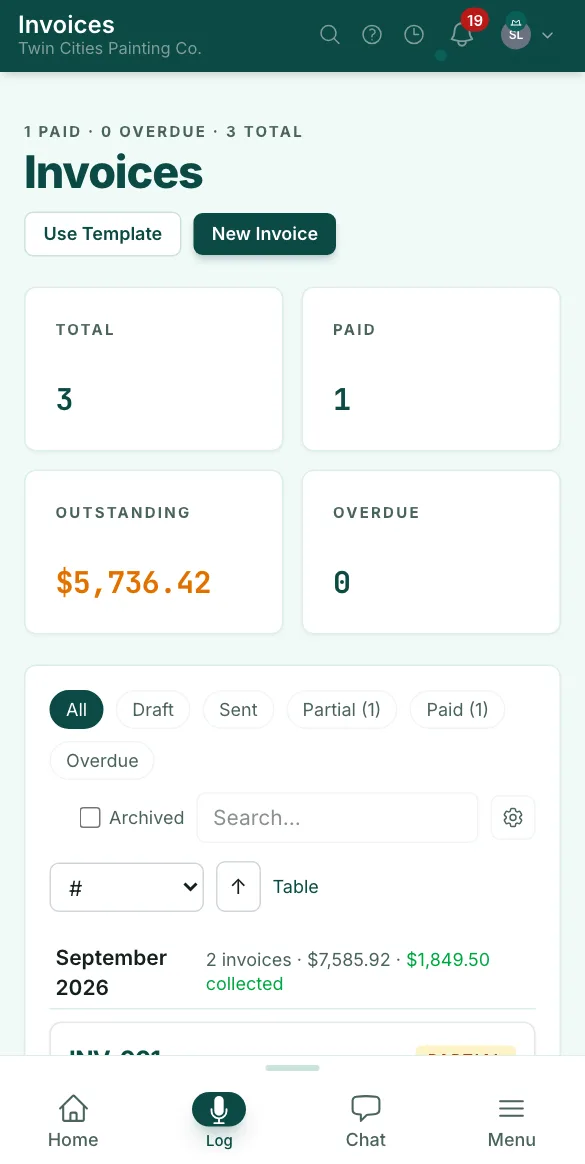
Turn an approved estimate into an invoice, take card payments online, and see every balance in one list.
- One click turns an approved estimate into an invoice, with its deposit and payment schedule.
- Your customer gets an email with a link and a PDF, and can pay by card online once you connect Stripe.
- You choose whether the customer pays the card fee or you absorb it.
- Record cash, check, Zelle and Venmo payments the day they arrive.
- See when your customer first opens the invoice.
- One list shows every invoice and its balance: paid, partly paid, outstanding or overdue.
The problem
You finish the job, send the invoice, and hope you made money.
Most painting businesses price the next job off a gut feel about the last one — never the real numbers. That's how good years quietly turn into thin ones.
How it works
Automatic job costing. Know what every job actually cost.
Clock-ins and receipts become each job's real cost, measured against the estimate — while the job is still running.
- The estimate
Your estimate becomes the budget
Price the job the way you already do — sections, line items, labor and materials. Once the customer signs online, turn the estimate into the job in one click. Its hours and materials become the budget every clock-in and receipt is measured against. Nothing gets typed twice.
Your estimateJob budget - The hours
Every hour, costed at what it really costs
While your painters are on the clock with Painter's Log open, job-site geofences keep each hour with the job they're at — and split the day when they move to the next house. Every hour carries the wage, your labor burden and any overtime premium.
An example hour$25wage+30%burden=$32.50an hour - The materials
Each receipt lands on the job you pick
Snap the receipt at the counter and pick the job. Painter's Log reads the store, the date, the totals and every line — product, quantity, price, even color and sheen — flags anything that doesn't add up, and adds it to that job's materials.
On the jobPaint storeTotal$150 - The result
See what you're making, not just what you're billing
Actual labor and materials sit next to the estimate while the job runs, so a job going sideways shows up while you can still do something about it.
Job price−job costs=your gross profit.
Then the same job carries through to the invoice and the payment.
The same Friday, two ways
Tracking hours by hand vs. with Painter's Log
Maria paints for you at $25 an hour and has 36 hours in by Thursday night. Here's her Friday on a paper timesheet — and in Painter's Log.
By hand
Timesheet — week of Sept 21
M–ThMaria36 hrs
FriSmith job10 hrs
Friday: 10 × $25= $250
- Lee kitchen: nothing
- Overtime: nowhere
- Burden: not counted
With Painter's Log
Maria's Friday, split by job site
Illustration7 am – 1 pm · 6 hours
Smith exterior
$253.50
- 6 h × $32.50 (wage + burden)
- $195.00
- Overtime share
- +$58.50
Charged to the Smith job.
Past 40 hours: 6 h at 1.5×
Maria passed 40 hours on Friday, so her last 6 hours are overtime. Painter's Log spreads that premium across her day by time on each stop and costs every hour with your burden. The paint‑store run's share stays off both customers' jobs.
Where the money goes
Where painting margins leak
Four ways a job's real cost goes missing. The first three are from Maria's Friday.
+$7.50 on every $25 hour
At a 30% burden: the payroll taxes, comp and insurance a bare wage leaves out.
+$97.50 one overtime Friday
The overtime premium on 6 hours, burdened — a cost a base‑rate estimate never charges.
2 jobs one timesheet line
A day split between two houses, written up as one.
$0 receipts in the truck
Materials that never make it onto the job.
Painter's Log puts all four back on the job.
Now try a whole job
An extra day. Another paint run. What's left?
The price stays the same. The work doesn't always. Move the crew's hours and add a receipt — the margin moves with them, as it does on every job in Painter's Log, so you know what's left before the last invoice.
Two-story exterior repaint
Price $6,000You keep
$1,825margin
You keep $1,825, a 30.4% margin.
- Labor, with burden
- $3,575
- Materials
- $600
Example assumptions
$25/hr wage, 30% labor burden, $600 of materials to start. Painter's Log uses your own rates and your own burden.
Reports → Jobs
Every finished job shows its profit and margin, so you can see which jobs lost money and why.
A job's cost is built from the hours clocked to it — each painter's pay rate plus labor burden — and the receipts filed to it. Painter's Log sets that against the contract amount, and shows the hours worked next to the hours budgeted.
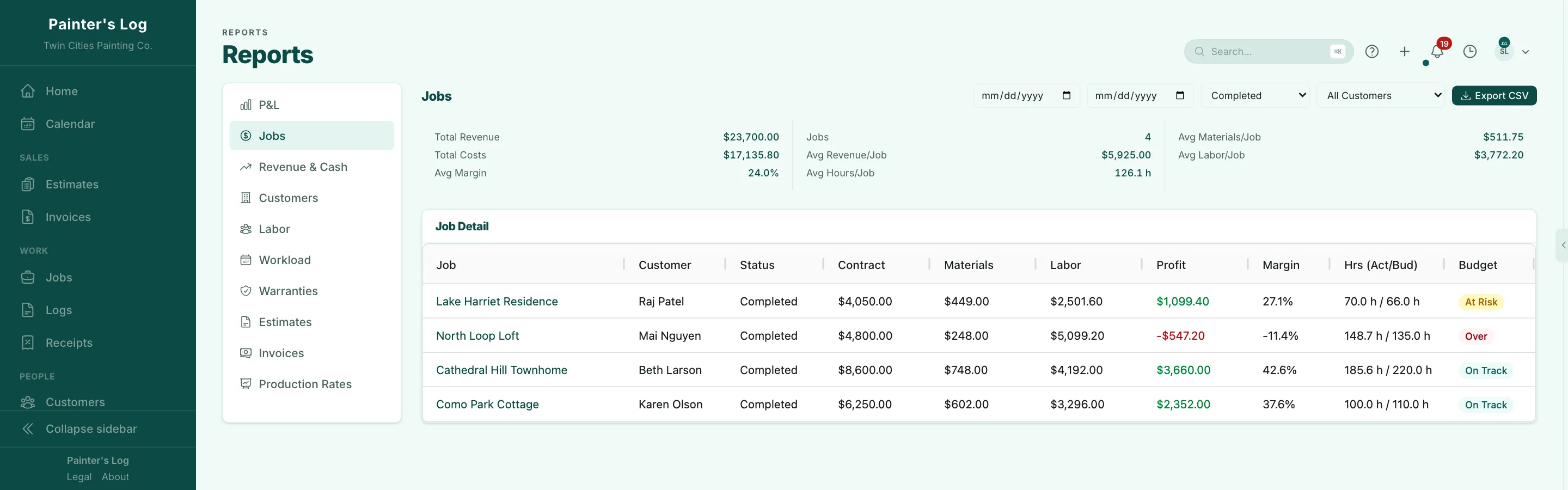
The job that lost money
North Loop Loft
A $4,800 contract with $5,347.20 in labor and materials — a $547.20 loss. The crew worked 149 hours against 135 budgeted, so the hours are the place to look before pricing the next loft.
Honest setup
What it needs from you
Automatic doesn't mean magic. Four things make the numbers right.
Set your burden and overtime once
In Settings, enter your labor burden — payroll taxes, workers' comp, insurance — and your weekly overtime threshold and multiplier. Both start off, so until you set them, labor is costed at the bare wage.
Once
Give every worker a pay rate
Labor cost is hours × rate. If someone has no rate on record, the job's cost panel shows their labor as missing, with a note saying why — instead of quietly counting those hours as free.
Once per worker
Give every job an address
Each job's geofence is drawn around its address. If a phone clocked into the job spends the whole shift miles away, the job is flagged so you can fix the address. After clock-out, you can move any part of anyone's day to another job or split it in two — the hours move, the pay doesn't.
Once per job
Snap receipts to the job
Your painters can snap their own receipts at the counter. A receipt without a job waits in your receipts list, marked “no job”, until you assign it — and you can correct any line that was read wrong.
Every receipt
Free calculator
What does an hour of your crew really cost?
Not sure what your burden is? The free hourly-cost calculator adds payroll taxes, workers' comp, liability and benefits to a wage and gives you the percentage to enter. No account needed.
Find your hourly costWho builds it
Built by a working painter.
Running his painting business, Kevin Spahn lived the problems Painter's Log is built to solve: pricing jobs by gut, losing track of hours, spending evenings on admin instead of with family.
I'm building the tool that I wish I had when I was starting out on my own as a painting contractor, trying to figure things out on the fly.
Also included
One system. Every feature on the free plan.
- Change orders
- Time & materials billing
- Estimate follow-up emails
- Payment receipts by email
- Paint colors by room
- Job photos
- Job timeline & voice notes
- Customer history
- Timecards & overtime
- Job, labor & profit reports
- AI assistant on your data
- Subcontractors & 1099s
- Warranties & claims
- Estimate expiry dates
Stop guessing. Start knowing.
Free forever — not a 14‑day trial.
- Every feature included
- No credit card
- 2 users · 5 jobs per month
The free plan never expires and never locks a feature. It has usage limits and a 1% fee on payments you collect through Painter's Log — when your crew outgrows the limits, move to Pro.
Start tracking your next job — freePlans
Two plans, every feature on both.
They differ in how many users are included, how much you can do each month, and the fee on payments you collect through the app.
Free
$0/month
plus 1% on payments you collect through Painter's Log
- Features
- Every feature included
- Users
- 2 users (owner + 1)
- Jobs
- 5 per month
- Estimates, invoices and change orders
- 20 per month, combined
- Receipts
- 25 per month
- Fee on payments you collect
- 1%
Free also limits file storage to 2 GB, and the AI assistant to 300k chat tokens and 10 voice minutes per user per month.
Start freePro
For growing crews$179/month
or $149/month billed annually
- Features
- Every feature included
- Users
- 4 users included (owner + 3)+$29/month for each additional user ($24/month billed annually)
- Jobs
- No limit
- Estimates, invoices and change orders
- No limit
- Receipts
- No limit
- Fee on payments you collect
- 0%
Every account starts on Free; you upgrade to Pro from Settings.
Start free, upgrade anytime
Stripe's standard processing rates apply on both plans and are paid to Stripe. Full pricing details
Comparing painting software?
See how it lines up
Pick a tool for a quick look, then read the full comparison — sourced from each tool's own published pages.
Painter's Log vs Jobber
Both products support job costing. Compare the labor setup, material inputs and daily workflow you need, then check the plan that includes them.
- Built for
- JobberField service businesses across many industries
- Painter's LogPainting contractors only
- Job costing
- JobberCalculates job profitability from timesheet labor, line-item costs and expenses; availability depends on plan
- Painter's LogThe core of the product — estimate vs. actual, per job, as the hours and receipts come in
- Free tier
- JobberFree trial; check current terms on Jobber's pricing page
- Painter's LogFree forever — 2 users (owner + 1), 5 jobs/mo, 20 documents/mo, 25 receipts/mo, 1% on payments collected through the app (0% on Pro). No credit card.
Sources checked
Both products support job costing. Compare the labor setup, material inputs and daily workflow you need, then check the plan that includes them.
- Built for
- JobberField service businesses across many industries
- Painter's LogPainting contractors only
- Job costing
- JobberCalculates job profitability from timesheet labor, line-item costs and expenses; availability depends on plan
- Painter's LogThe core of the product — estimate vs. actual, per job, as the hours and receipts come in
- Free tier
- JobberFree trial; check current terms on Jobber's pricing page
- Painter's LogFree forever — 2 users (owner + 1), 5 jobs/mo, 20 documents/mo, 25 receipts/mo, 1% on payments collected through the app (0% on Pro). No credit card.
Sources checked
Questions
Questions contractors ask
Straight answers about your crew, your data, and how the numbers are worked out.
Will my crew actually use it?
Painter's Log runs in the web browser on their phone, so there's nothing to install from an app store. Clocking in takes two taps, they can leave voice notes instead of typing, and each person can set the app to English or Spanish.
How long does setup take?
Create a job and start logging the same day. Already have estimates in another tool? Upload your proposal, review the scope Painter's Log pulls out of it, and create the job in minutes.
Can Painter's Log split a painter's day between two jobs?
Yes. While a painter is clocked in with Painter's Log open, job-site geofences split the shift between the jobs they work. A paint-store run or the drive between houses stays off every customer's job — it's recorded as unassigned time you can mark as overhead. After clock-out, you can review and correct any segment.
Can I see costs before a job is finished?
Yes. Hours count as they're worked — an open shift adds to the job while the painter is still on the clock — and receipts count as soon as they're read. What you see is cost to date, not a forecast of the work still ahead.
Does labor burden change what my employees are paid?
No. Burden raises the cost Painter's Log uses for job costing, so each job carries what an hour really costs you. Timecards and pay stay at the worker's rate.
What if I already use QuickBooks or Jobber?
Painter's Log runs the work around your painting jobs — estimating, scheduling, time, receipts, invoicing and job costing. Keep QuickBooks for your books; use Painter's Log to run the jobs and see what each one actually made. If you use Jobber, we cover the same job workflow, built around painting. See how the two line up:
Is my data safe?
Your data is yours, kept separate for each business, and preserved if you ever downgrade or cancel.
Is Painter's Log really free?
Yes — free forever, not a 14‑day trial, with every feature included. The free plan is capped by usage — including 2 users (owner + 1), plus 5 jobs, 20 estimates, invoices and change orders, and 25 receipts per month. We only make money when you do: 1% on payments you collect through Painter's Log while you're free, 0% on Pro. Pro is $179/month with 4 users included, plus $29/month per extra worker. The pricing page has the full list: